
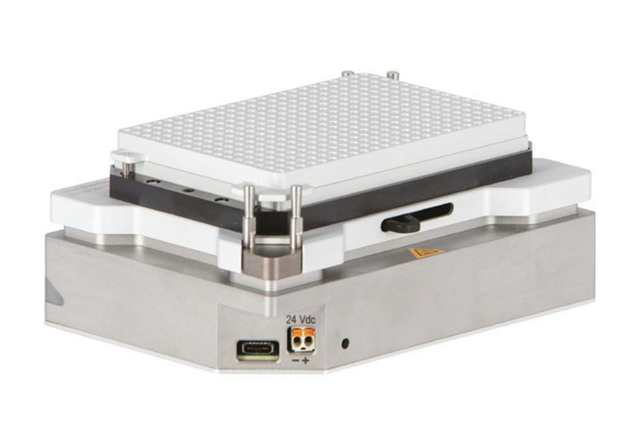
Support for your Inheco Teleshake AC USB
Welcome to the support area for Inheco Teleshake AC USB.
Answers to common issues
As this is a new product there are no common issues known. Please check the knowledge base and error list for new entries on a regular basis.
Here you can find Instructions, Software and Troubleshooting tips that can help you solve the problem before you contact us.
If you need personal advice, we look forward to hearing from you, by phone or by e-mail.
Inheco technical support
Phone: +49 89 899593-121 (Monday to Friday 8 a.m. to 5 p.m. CET)
Email: techhotline@inheco.com
Instructions and Operating manuals:
Choose the manual for your instrument and download it as a PDF document.
Support Software/dll
Download the latest software.
Possible root causes:
- not correctly connected to 24V
- USB cable not connected / pluged in correctly
- USB cable defectice
- Power supply defective
- Device defective
Description:
The device Manager Software does not show the serial number / connection to the USB device
Solution:
Check the LED status of your device, if it is just blinking green the 24 V are not applied correctly.
unplug power supply from mains
The device Manager Software does not show the serial number / connection to the USB device
Solution:
Check the LED status of your device, if it is just blinking green the 24 V are not applied correctly.
unplug power supply from mains
- connect to the power inlet again and check that it is tightly inserted
- plug in power supply to mains
- Check LED status, 24V only apply when the LED eventually changes to sold green
- If LED status is still only blinking green the Power supply might be defective. Measure the voltage with a multimeter
- if no 24V are shown Power supply is defective
- if 24 V are shown the device might be defective
- Check whether the USB cable is not plugged in correctly
- exchange USB cable
If you cannot get a connection get in contact with techhotline@inheco.com.
Possible root cause:
- device not correctly connected to 24V
- motor for clamping mechanism has a problem
Solution:
Check the LED status of your device, if it is just blinking green the 24 V are not applied correctly.
Check the LED status of your device, if it is just blinking green the 24 V are not applied correctly.
- unplug power supply from mains
- connect to the power inlet again and check that it is tightly inserted
- plug in power supply to mains
- Check LED status, 24V only apply when the LED eventually changes to sold green
- If LED status is still only blinking green the Power supply might be defective. Measure the voltage with a multimeter:
- if no 24V are shown Power supply is defective
- if 24 V are shown the device might be defective
- Check whether the upper part of the Teleshake is perfectly alligned to the Teleshake. If you see it tilted it needs to be placed back correctly. Please contact techhotline@inheco.com if you are unsure about this.
- Push gently against the lever to be in the closed position in some cases especially after transportation it was found to be not in the final endposition.
Description
While shaking the device sounds different than usual?
Root causes
While shaking the device sounds different than usual?
Root causes
- Labware it not fixed correctly
- upper part is not installed correctly
- device lost at least one cog when the upper part was lifted
Solution:
- Check whether plate is hold correctly by the pins
- Check whether the upper part of the Teleshake is perfectly alligned to the Teleshake. If you see it tilted it needs to be placed back correctly. Please contact techhotline@inheco.com if you are unsure about this.
- Check whether you see the two cogs in when you lift the upper part carefully. Please contact techhotline@inheco.com if you unsure how to perform this.
Description
You observe problems with the shaker performance? For example, the shaker seems just to vibrate or is shaking slower as you want? Or maybe it is not shaking at all?
First Root cause
The shaking performance depends on the different factors, such as weight of plate or fixation to the ground. Especially if you observe only vibration.
Description
You observe problems with the shaker performance? For example, the shaker seems just to vibrate or is shaking slower as you want? Or maybe it is not shaking at all?
First Root cause
The shaking performance depends on the different factors, such as weight of plate or fixation to the ground. Especially if you observe only vibration.
Solution:
Please visit the device specific manual to check the maximum allowed weight. Check your weight of adapter and plate.
For your information:
The standard shaker such as the Thermoshake or the Teleshake have a maximum speed of 2000 rpm when empty. As soon as weight is applied it cannot reach the maximum speed anymore.
For example, at a weight of 250g the maximum possible shaking speed is about 1300 rpm and with 500g the maximum possible shaking speed is 1100 rpm.
If you need to shake plates with high weights with high shaking speed, we recommend using the Thermoshake AC or Teleshake AC with active clamping. The shaking motor is less depending on the weight and can shake up to 3000rpm event with maximum allowed weight of 1000g.
You observe problems with the shaker performance? For example, the shaker seems just to vibrate or is shaking slower as you want? Or maybe it is not shaking at all?
First Root cause
The shaking performance depends on the different factors, such as weight of plate or fixation to the ground. Especially if you observe only vibration.
Description
You observe problems with the shaker performance? For example, the shaker seems just to vibrate or is shaking slower as you want? Or maybe it is not shaking at all?
First Root cause
The shaking performance depends on the different factors, such as weight of plate or fixation to the ground. Especially if you observe only vibration.
Solution:
Please visit the device specific manual to check the maximum allowed weight. Check your weight of adapter and plate.
For your information:
The standard shaker such as the Thermoshake or the Teleshake have a maximum speed of 2000 rpm when empty. As soon as weight is applied it cannot reach the maximum speed anymore.
For example, at a weight of 250g the maximum possible shaking speed is about 1300 rpm and with 500g the maximum possible shaking speed is 1100 rpm.
If you need to shake plates with high weights with high shaking speed, we recommend using the Thermoshake AC or Teleshake AC with active clamping. The shaking motor is less depending on the weight and can shake up to 3000rpm event with maximum allowed weight of 1000g.
Second Root cause
Shaker is not fixed properly to the ground.
Solution:
Visit the device specific manual to learn more about the fixation of your device. Without fixation the shaker is imbalanced, and the devices stops shaking at high speed.
Third Root cause
Hardware defect at shaking motor or at clamping mechanism. In this case you should see a shaking specific slot error at the display or in the error code report of the Inheco Demotool.
Solution:
Check the error code list for recommendations regarding the error displayed at the controller or in the error code report.
Forth Root cause
If you use an adapter it might have been screwed too tight to the shaking device. Please note that only up to 10 Ncm are allowed to by used.
Solution:
loosed the adapter and tighter it with not more than 10 Ncm.
Shaker is not fixed properly to the ground.
Solution:
Visit the device specific manual to learn more about the fixation of your device. Without fixation the shaker is imbalanced, and the devices stops shaking at high speed.
Third Root cause
Hardware defect at shaking motor or at clamping mechanism. In this case you should see a shaking specific slot error at the display or in the error code report of the Inheco Demotool.
Solution:
Check the error code list for recommendations regarding the error displayed at the controller or in the error code report.
Forth Root cause
If you use an adapter it might have been screwed too tight to the shaking device. Please note that only up to 10 Ncm are allowed to by used.
Solution:
loosed the adapter and tighter it with not more than 10 Ncm.
Possible root cause:
- Power supply not connected correctly
- Defective power supply
- Blown fuse
- Defective PCB board
Solution:
- Make sure the plug of the power supply is inserted correctly (refer to Teleshake AC USB Manual), It it was not inserted correctly according + and - the power supply might be defective or the fuse of the Teleshake is blown. Contact techhotline for further information.
- Use a different power supply
You need to connect to the device with the Teleshake AC USB Device Manager. Go to the Errors tab and use the "Read all Errors" button
To retrieve the full communication logs as a .txt file. You need to connect to the device with the Teleshake AC USB Device Manager. Go to the "Device" button and access the logs.
There is also a tab called "Log" which shows log information during the run.
There is also a tab called "Log" which shows log information during the run.
Error Code List Teleshake AC USB
The error list of the Teleshake AC USB show two different types of error
- warning
This means the device is fully operable but needs attention to make sure that the experiments are performed properly
- Error
This means the device is not operable anymore it is in Error state and needs an action to move forward.
Normal return message. This is not an error but only an information that the send command is accepted and will be executed.
Device temperature is too high Error - temperature control stopped
- Invalid calibration values
- Sensor values changed by interference (EMC)
- Temperature of 135°C exceeded
The difference between the control and monitor temperature sensors is too high Warning
- Inhomogeneous loading of the contact plate
- (One) Sensor defective (ref. to short circuit error)
- Invalid calibration values
- Sensor values changed by interference (EMC)
- Maximum span of the temperature sensors exceeded (>10 K)
The temperature control sensor is in short circuit Error - temperature control stopped
- Cable breakage due to wear, internal short circuit (e.g. damage on a sharp edge)
- Invalid calibration values
- Sensor values changed by interference (EMC)
The temperature monitor sensor is in short circuit Error - temperature control stopped
- Cable breakage due to wear, internal short circuit (e.g. damage on a sharp edge)
- Invalid calibration values
- Sensor values changed by interference (EMC)
Cable break for the temperature control sensor detected Error - temperature control stopped
- Sensor disconnected
- Sensor connection or wire broken -
- Cable breakage due to wear, internal short circuit (e.g. damage on a sharp edge) - Invalid calibration values
- Sensor values changed by interference (EMC)
Cable break for the temperature monitor sensor detected Error - temperature control stopped
- Sensor disconnected
- Sensor connection or wire broken -
- Cable breakage due to wear, internal short circuit (e.g. damage on a sharp edge) - Invalid calibration values
- Sensor values changed by interference (EMC)
Clamps could not open Error - shaker control deactivated
- Power supply voltage <15 V => Servo drive not usable
- Device already remains within a different error state
- Mechanical blockage
- Firmware: after 3 sec. the feedback signal will be read
Clamps could not close Error - shaker control deactivated
- Power supply voltage <15 V => Servo drive not usable
- Device already remains within a different error state
- Mechanical blockage
- Firmware: after 3 sec. the feedback signal will be read
The position of clamp is unknown Error - shaker control deactivated
- Servo drive defective
- Clamp state "open" and "closed" not defined (missed during internal configuration)
- Feedback signal of the servo drive invalid/faulty
Motor overcurrent detected Error - shaker control deactivated
- Motor defective
- Mechanical blockade of the motor due to too high external resistance to the motor shaft (>>1 kg) -
- Ball bearing of the contact plate loosened
Power undervoltage detected Error - temperature and shaker control stopped
- Power supply voltage <3 V --> Status-LED=red
- Device is disconnected from the power supply or must be removed and reconnected
- A different error occurs first (Status-LED=red), error 43 occurs afterwards (e.g. error 49: Logic power undervoltage detected)
Power overvoltage detected Error - temperature and shaker control stopped Power supply voltage >29 V --> Status-LED=red
The shaker cannot reach the target position Warning
- Mechanical blockage of the motor due to too high external resistance to the motor shaft (>>1 kg)
- Incorrect assembly of the contact plate -
- Motor defective, e.g. broken wire
- Threshold ±5° (angle)
Logic Power undervoltage detected Error - temperature and shaker control stopped
- Power supply voltage <8,5 V --> Status-LED=red
- Defective heating cable (short circuit or broken wire) - Short circuit between PCB and enclosure (e.g. pins of the 24 V power connector)
- Device is disconnected from the power supply or must be removed and reconnected
Clamping system overcurrent detected overcurrent detected Warning
- Servo drive or power supply defective
- Current measurement of the servo drive not valid
- Load for the servo drive too high or defective cam plate
Error Code List Teleshake AC USB
The error list of the Teleshake AC USB show two different types of error
The error list of the Teleshake AC USB show two different types of error
- warning
This means the device is fully operable but needs attention to make sure that the experiments are performed properly - Error
This means the device is not operable anymore it is in Error state and needs an action to move forward.
Normal return message. This is not an error but only an information that the send command is accepted and will be executed.
Device temperature is too high Error - temperature control stopped
- Invalid calibration values
- Sensor values changed by interference (EMC)
- Temperature of 135°C exceeded
The difference between the control and monitor temperature sensors is too high Warning
- Inhomogeneous loading of the contact plate
- (One) Sensor defective (ref. to short circuit error)
- Invalid calibration values
- Sensor values changed by interference (EMC)
- Maximum span of the temperature sensors exceeded (>10 K)
The temperature control sensor is in short circuit Error - temperature control stopped
- Cable breakage due to wear, internal short circuit (e.g. damage on a sharp edge)
- Invalid calibration values
- Sensor values changed by interference (EMC)
The temperature monitor sensor is in short circuit Error - temperature control stopped
- Cable breakage due to wear, internal short circuit (e.g. damage on a sharp edge)
- Invalid calibration values
- Sensor values changed by interference (EMC)
Cable break for the temperature control sensor detected Error - temperature control stopped
- Sensor disconnected
- Sensor connection or wire broken -
- Cable breakage due to wear, internal short circuit (e.g. damage on a sharp edge) - Invalid calibration values
- Sensor values changed by interference (EMC)
Cable break for the temperature monitor sensor detected Error - temperature control stopped
- Sensor disconnected
- Sensor connection or wire broken -
- Cable breakage due to wear, internal short circuit (e.g. damage on a sharp edge) - Invalid calibration values
- Sensor values changed by interference (EMC)
Clamps could not open Error - shaker control deactivated
- Power supply voltage <15 V => Servo drive not usable
- Device already remains within a different error state
- Mechanical blockage
- Firmware: after 3 sec. the feedback signal will be read
Clamps could not close Error - shaker control deactivated
- Power supply voltage <15 V => Servo drive not usable
- Device already remains within a different error state
- Mechanical blockage
- Firmware: after 3 sec. the feedback signal will be read
The position of clamp is unknown Error - shaker control deactivated
- Servo drive defective
- Clamp state "open" and "closed" not defined (missed during internal configuration)
- Feedback signal of the servo drive invalid/faulty
Motor overcurrent detected Error - shaker control deactivated
- Motor defective
- Mechanical blockade of the motor due to too high external resistance to the motor shaft (>>1 kg) -
- Ball bearing of the contact plate loosened
Power undervoltage detected Error - temperature and shaker control stopped
- Power supply voltage <3 V --> Status-LED=red
- Device is disconnected from the power supply or must be removed and reconnected
- A different error occurs first (Status-LED=red), error 43 occurs afterwards (e.g. error 49: Logic power undervoltage detected)
Power overvoltage detected Error - temperature and shaker control stopped
Power supply voltage >29 V --> Status-LED=red
The shaker cannot reach the target position Warning
- Mechanical blockage of the motor due to too high external resistance to the motor shaft (>>1 kg)
- Incorrect assembly of the contact plate -
- Motor defective, e.g. broken wire
- Threshold ±5° (angle)
Logic Power undervoltage detected Error - temperature and shaker control stopped
- Power supply voltage <8,5 V --> Status-LED=red
- Defective heating cable (short circuit or broken wire) - Short circuit between PCB and enclosure (e.g. pins of the 24 V power connector)
- Device is disconnected from the power supply or must be removed and reconnected
Clamping system overcurrent detected overcurrent detected Warning
- Servo drive or power supply defective
- Current measurement of the servo drive not valid
- Load for the servo drive too high or defective cam plate